Why Is My Website Slow? Causes and Fixes
In this post
Read a PageSpeed reportWhy speed varies by visitorSix causes and fixes30-day planWorked exampleFix it yourself or get help?FAQA slow website costs a small business visitors, enquiries and trust, usually without any warning. Nobody emails to say your page took too long; they simply leave. This guide shows how to confirm the problem, read a PageSpeed report, fix the six most common causes on WordPress, page-builder and custom sites, and follow a 30-day plan that produces measurable results.
It is written for owners and managers of small business sites, and for anyone who maintains a site for them. Most fixes need no developer, and where one is needed we say so. If you would rather have someone diagnose it for you, our website audit does exactly that.
Confirm it’s slow: reading a PageSpeed report step by step
Don’t judge by how the site feels on your own device. You have probably visited it before, so your browser has stored much of it, and your connection may be faster than your customers’.
- Open Google’s free PageSpeed Insights, enter a page address and run the test. Check the Mobile tab first, then Desktop.
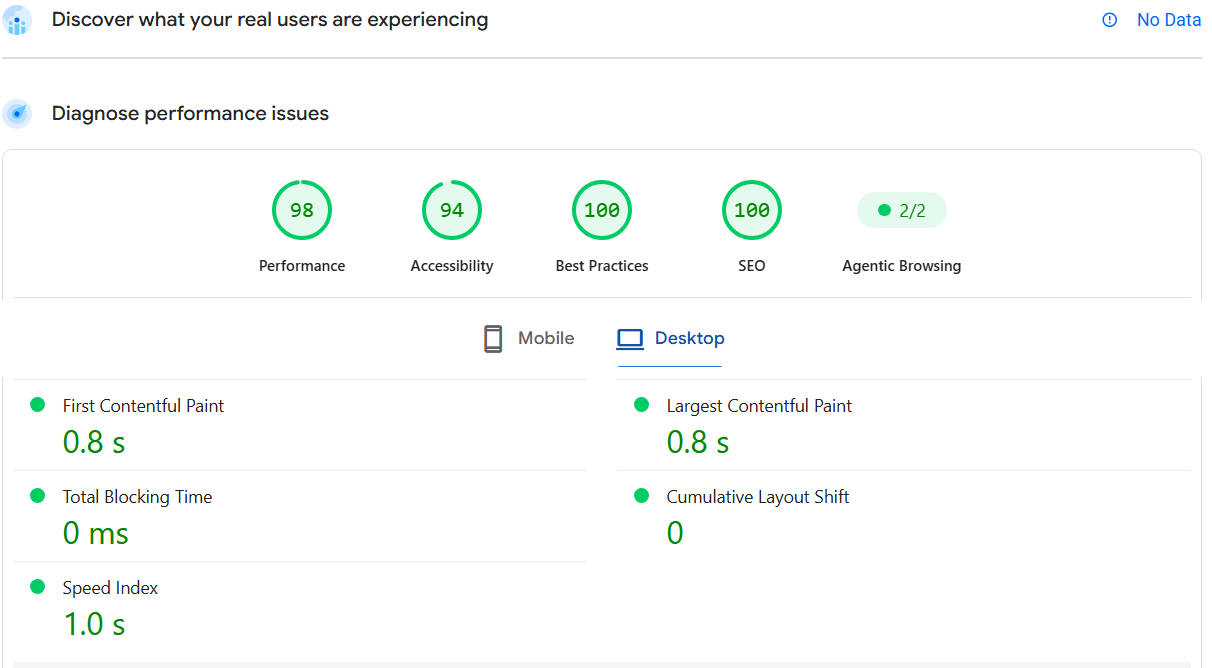
- The top section, “Discover what your real users are experiencing”, shows data from actual visitors.
- Under “Diagnose performance issues” you get four scores: Performance, Accessibility, Best Practices and SEO. Red is 0 to 49, orange is 50 to 89 and green is 90 to 100. This guide focuses on Performance.
- Read the metrics. First Contentful Paint is when anything first appears. Largest Contentful Paint is when the main content appears. Total Blocking Time is how long the page ignores taps while loading. Cumulative Layout Shift is how much the page jumps. Speed Index is how quickly the page visually fills in. Our Core Web Vitals guide explains these in more detail.
- Scroll to the opportunities and diagnostics. They list what is slowing the page, often with estimated time savings. Start with the biggest.
Scores change from run to run, so test each page two or three times and focus on the pattern. Test your busiest page and your enquiry page, not only the homepage.
Why the same site is fast for one visitor and slow for another
Speed depends on three things you don’t control: the visitor’s device, their connection and how far they are from your server. A customer on a mid-range phone using patchy mobile data in one city has a very different experience from someone on a laptop with fibre in another. Businesses that serve customers in more than one country feel this most.
- Look at mobile results first. The mobile test simulates a slower phone on a slower connection, which is why mobile scores are usually lower.
- Throttle your connection. In Chrome’s developer tools, the Network tab lets you choose a slower connection and reload the page.
- Test from different places. Free tools such as WebPageTest let you pick a test location.
- Check where your server is. If most visitors are far from it, a content delivery network (CDN) or a closer hosting region can help. Our hosting and domain guide covers the basics.
The six most common causes and how to fix each
1. Oversized images
How to spot it: PageSpeed flags “Properly size images”, “Serve images in next-gen formats” or “Efficiently encode images”, or the page is several megabytes. Photos uploaded straight from a camera or phone are the usual source.
- Resize each image to the largest size it is actually displayed at. A space 1,200 pixels wide doesn’t need a 4,000-pixel photo.
- Compress it and save it in a modern format such as WebP.
- Lazy-load images below the fold, but not the main banner image, because delaying that one slows the main content.
- Set width and height on images so the layout doesn’t jump. On WordPress an image optimisation plugin handles existing uploads in bulk; on custom sites this belongs in the build process.
2. Too many plugins and scripts
How to spot it: PageSpeed flags “Reduce unused JavaScript” or “Reduce the impact of third-party code”, and the page makes dozens of requests. Chat widgets, sliders, trackers and social feeds all add weight.
- List everything installed and remove inactive plugins and anything you can’t justify.
- Replace several single-purpose plugins with one well-built one where possible.
- Delay chat widgets and non-essential trackers until after the page has loaded or the visitor interacts.
- Take a backup first, because removing a plugin can break a page. Our backup guide shows how.
3. Slow or overloaded hosting
How to spot it: PageSpeed flags “Reduce initial server response time”, the site is slow even on a simple page, or it slows at busy times. A server response of around 0.8 seconds or less is commonly treated as good.
- Check your server response in the PageSpeed diagnostics before changing anything else.
- Upgrade the plan if you are on the cheapest shared tier and your traffic has grown.
- Choose a hosting region near most of your visitors, or add a CDN.
- Move provider only if the problem persists after the above. See the hosting and domain guide before you decide.
4. No caching or compression
How to spot it: Repeat visits are barely faster than the first one, or PageSpeed flags “Use efficient cache lifetimes” or “Enable text compression”.
- Turn on page caching. On WordPress that is a caching plugin or your host’s built-in option.
- Set browser caching for images, styles and scripts so returning visitors reuse them.
- Enable Brotli or gzip compression for text files.
- Test while logged out, because admin sessions are usually not cached.
5. Heavy themes, fonts and embeds
How to spot it: A large page-builder theme produces a lot of code, many font files load, or videos load automatically. PageSpeed flags “Avoid enormous network payloads” or “Minimize main-thread work”.
- Trim unused sections, widgets and animations, or move to a lighter theme. Our WordPress vs custom guide helps if a rebuild is on the table.
- Limit yourself to two font families and only the weights you use, and let text show while fonts load.
- Show a thumbnail and load the video only when someone clicks it.
6. An unmaintained or compromised site
How to spot it: Plugins and themes are out of date, the database is full of old revisions and spam, or the site suddenly slowed and you notice unfamiliar redirects or files.
- Back up, then update everything and remove unused plugins and themes.
- Clean old revisions and spam from the database.
- If a sudden slowdown comes with odd behaviour, check for a compromise using our hacked website guide.
- Schedule routine upkeep so it doesn’t build up again. What website maintenance includes explains what to cover.
💬 Not sure which of these is slowing your site? Our website audit finds the specific causes and sends you a prioritised list of fixes.
Get a fixed audit quote →A 30-day improvement plan
| Week | Focus | What to do |
|---|---|---|
| 1 | Measure and fix images | Record mobile and desktop scores for your three key pages. Resize and compress images, then retest. |
| 2 | Scripts and plugins | Remove unused plugins and scripts, delay chat and trackers, then retest. |
| 3 | Caching and hosting | Turn on caching and compression, check server response and decide whether hosting needs to change. |
| 4 | Fonts, embeds and monitoring | Trim fonts and video embeds, retest everything and set a regular check. See tracking website performance. |
Worked example: from 3.1 seconds to 0.8 seconds
This is a client site we optimised (name withheld). We tested the same page on desktop with PageSpeed Insights before and after the work, which covered the standard fixes described in this guide.
| Metric | Before | After |
|---|---|---|
| Performance score | 88 | 98 |
| First Contentful Paint | 2.9 s | 0.8 s |
| Largest Contentful Paint | 3.1 s | 0.8 s |
| Accessibility | 89 | 94 |
| Agentic Browsing | 1/2 | 2/2 |
The lesson is in the timings. A Performance score of 88 looks fine at a glance, but a 3.1-second Largest Contentful Paint sits above the 2.5-second line Google treats as good. That is the delay visitors feel, and it fell by roughly three quarters. Accessibility and Agentic Browsing also moved over the same period. These are lab results from one test each, so exact numbers vary between runs, and mobile results are usually lower and should be measured separately.
Fix it yourself or get help?
You can usually do yourself
- Compress and resize images before uploading
- Delete plugins you don’t use (after a backup)
- Turn on a caching plugin or your host’s caching
- Remove embeds and widgets you don’t need
Worth bringing in help
- High server response times or a hosting move
- Rebuilding a heavy theme or page builder
- Scripts that conflict or break the layout
- Enquiry forms, checkout or tracking involved
To find out exactly what is slowing your site, start with a website audit. If the work is mostly ongoing upkeep, such as updates, plugin clean-ups and backups, our website maintenance service covers it. Whatever you change, back up first and test your enquiry forms afterwards. Slow menus are a related problem; see mobile navigation mistakes.
Frequently asked questions
How fast should a website load?
Google treats a Largest Contentful Paint of 2.5 seconds or less as good. Aim for the main content of your key pages to appear quickly on a phone, not just on a fast desktop connection.
What is a good PageSpeed score?
Scores from 90 to 100 are shown in green, 50 to 89 in orange and below 50 in red. The timings behind the score matter more, because a page can score in the high 80s and still take over 3 seconds to show its main content.
Why is my website fast on desktop but slow on mobile?
The mobile test simulates a slower phone on a slower connection, and phones have less processing power than computers. Heavy images, scripts and fonts hurt far more there, so always check mobile results first.
Does website speed affect Google rankings?
Speed is part of Google’s page experience signals, but it is one of many factors. A faster site does not guarantee higher rankings, though a very slow site can lose visitors wherever it ranks.
Will new hosting or a new theme fix a slow site?
Sometimes, but not always. If oversized images, extra scripts or missing caching are the cause, they will slow the new setup too. Identify the cause first, then decide what to change.
Can a slow website cost me customers?
Yes. Visitors who wait too long often leave before they see your offer or contact you. We can’t promise a specific result from speeding a site up, because outcomes depend on traffic quality, your offer and competition.
Do you offer speed fixes?
Our website audit reviews speed on desktop and mobile and gives you a prioritised report. Carrying out the agreed fixes is a separate, optional service, quoted with scope and cost before work begins. For ongoing upkeep, see our website maintenance service.
Not sure what’s slowing your site down?
Share your website and your main concern. We’ll confirm the scope, price and delivery date in a fixed quote before any work begins.
Request an audit quote →